
Shared schedule views
A collaborative calendar presents relevant plans in one place so participants can understand the current shared picture.
Velixon product case study
ShareCal is a Velixon-owned product direction centered on a simple operational problem: individual calendars are good at recording personal events, but shared plans still fragment across texts, screenshots, and repeated questions.
Interface prototype
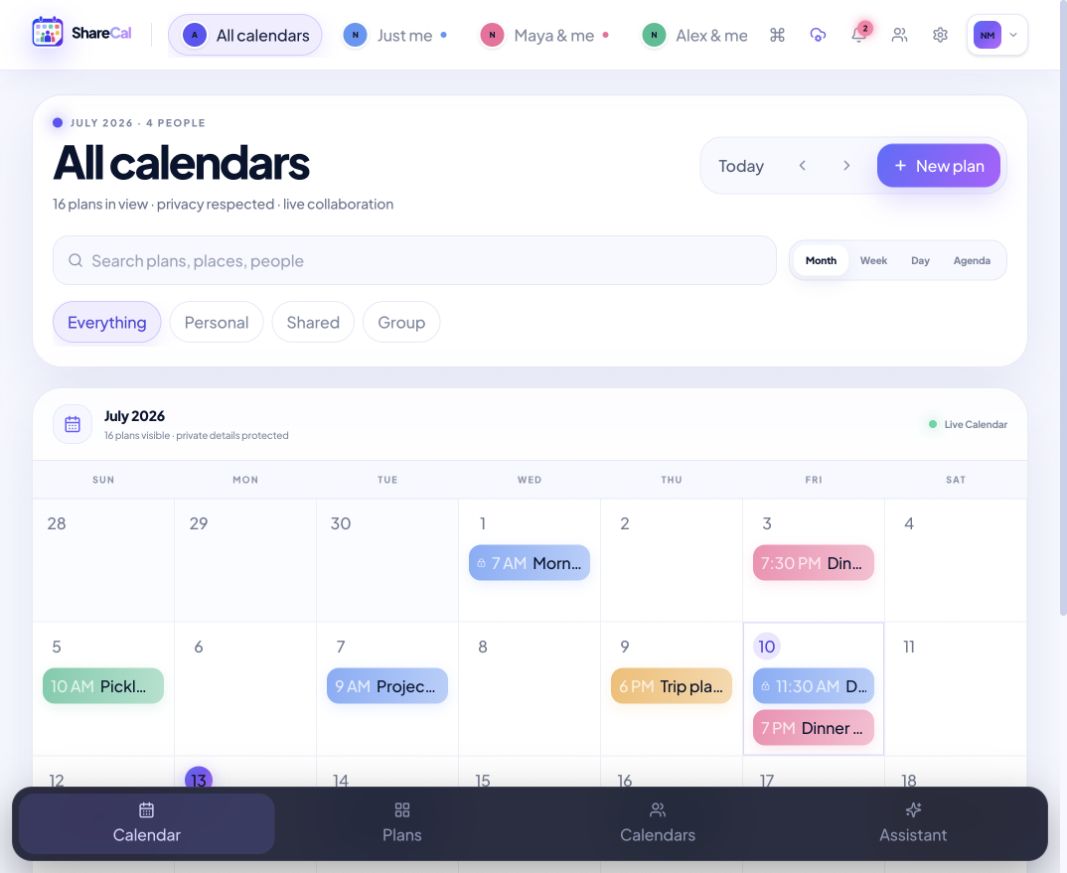
This is a real ShareCal interface prototype shown with illustrative, seeded data. Names, events, availability, and feature states are not customer records or evidence that every displayed integration is production-ready.
Visit the ShareCal previewThe problem
The solution
A collaborative calendar presents relevant plans in one place so participants can understand the current shared picture.
Event context and participant relationships are designed to remain understandable as schedules change.
The product direction prioritizes coordination and overlap rather than simply duplicating a traditional personal calendar.
The experience can distinguish the information a group needs from unrelated personal schedule details.
A connected record reduces the outdated screenshots and message fragments created by manual coordination.
The interface is designed for the mobile moments where people most often check, share, and adjust plans.
Delivery
Separate shared scheduling needs from the feature assumptions inherited from personal calendar products.
Design data relationships that can express participation, visibility, changes, and availability without collapsing privacy boundaries.
Test whether a person can answer who, what, and when quickly on desktop and mobile.
Specify how updates, cancellations, notifications, and stale information behave when several people depend on the same plan.
Use feedback and product learning to reduce coordination effort while keeping the interaction focused.
Business impact
The product is designed to reduce the need to piece together the current plan from multiple conversations.
A shared view makes the coordination question visible instead of requiring another round of messages.
Connected event state can replace screenshots and manually repeated changes.
People can understand which plans are shared and who needs the information.
ROI framework: For a team or organization, baseline the number of scheduling messages, reschedules, missed changes, coordination time, and meeting delays. For personal groups, use time saved and avoided confusion as experience measures rather than inventing a financial return.
Technology